An Internal Developer Portal, built for Kubernetes
Portainer-IDP lets developers deploy, scale, restart, roll back and monitor applications on Kubernetes without learning Kubernetes, inside guardrails your platform team sets once.
It runs on top of the Portainer you already operate, so developers sign in with their existing accounts, and your roles, teams and environments apply from day one.
Self-service needs more than a form
Letting developers deploy safely involves a lot of parts. Building and maintaining them is a platform project in its own right.
Portainer-IDP provides them ready to use, on top of the Portainer you already run.
Purpose-built for Kubernetes self-service
Purpose-built for Kubernetes
One job, done in depth: getting applications onto Kubernetes and keeping them healthy.
Complete where it counts
Five deploy routes, full day-two operations, role-based access, declared namespaces and Git-backed history, all included.
Built on what you already run
Developers sign in with their Portainer accounts, and roles, teams and environments come straight from Portainer.
No additional cost
Portainer-IDP is a no-cost add-on to Portainer Business.
Five ways to deploy
Developers arrive with different levels of Kubernetes knowledge, so there are five routes into the same GitOps flow.
Catalog
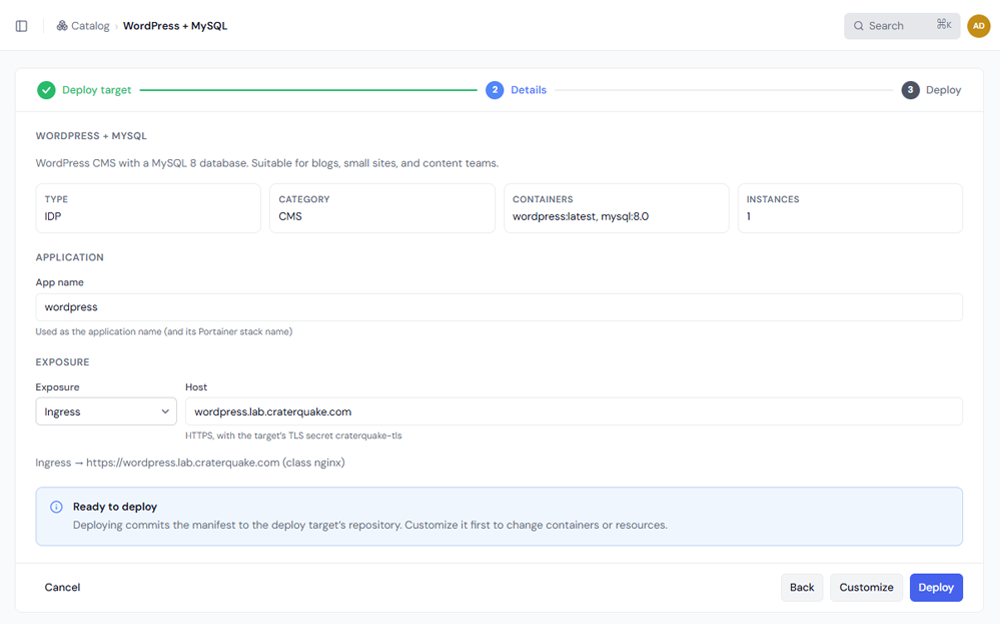
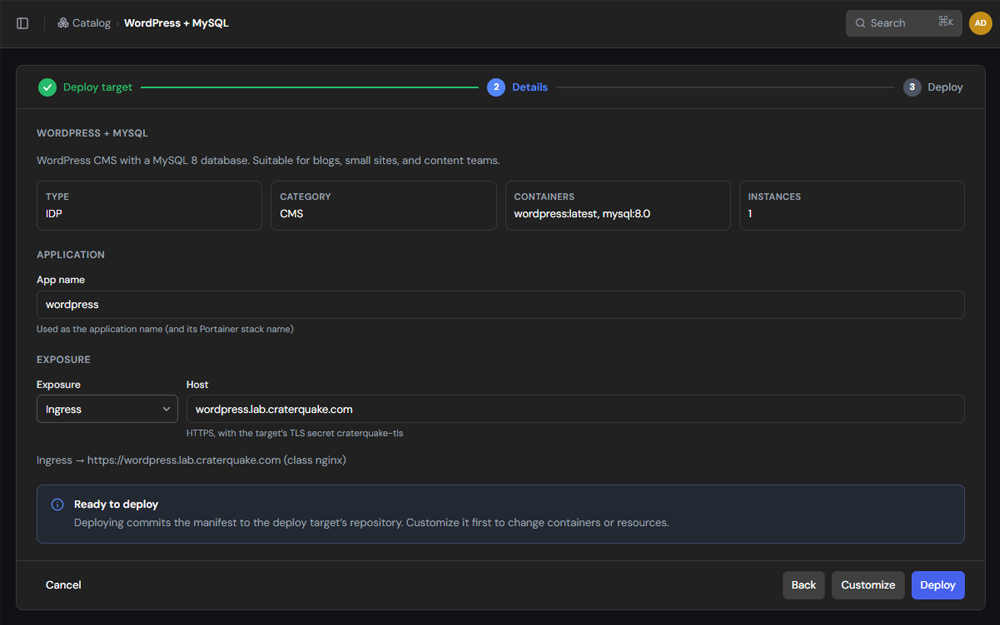
A guided wizard with seven starter application templates: WordPress with MySQL, Nginx, PostgreSQL with pgAdmin, Redis, Ghost with MySQL, Nginx as a StatefulSet, and PostgreSQL through the Bitnami Helm chart. A review step shows how the application will be exposed before anything is committed. Administrators can also add Helm charts to the catalog, with a pinned chart version and values you choose to lock.
Simple Deploy
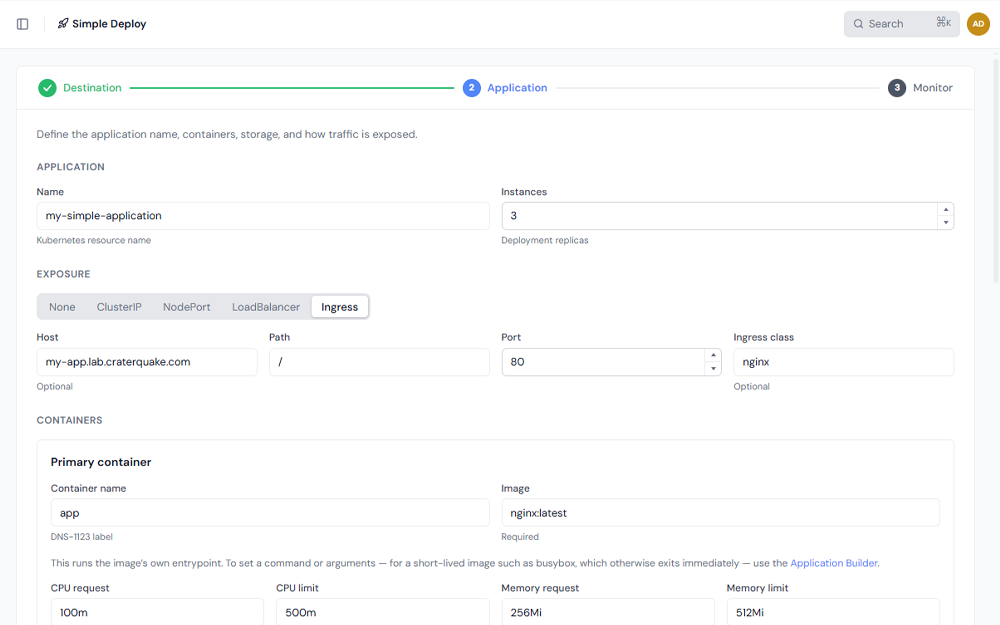
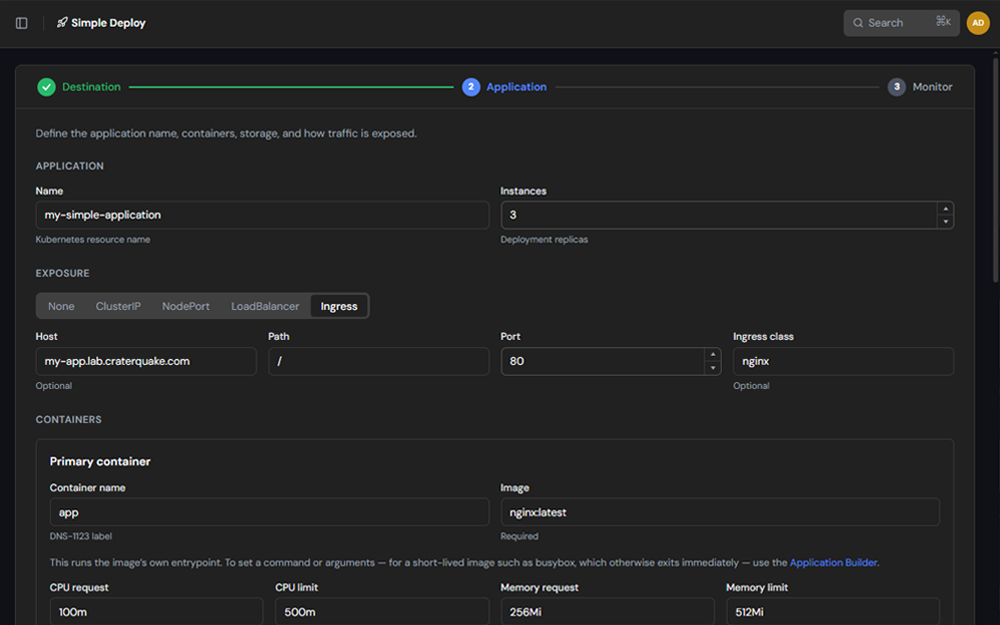
One form for a developer with a container image from your own or a public image registry: name, instances, CPU and memory, optional GPU, optional persistent volume, environment variables, service ports and ingress, with a live manifest preview.
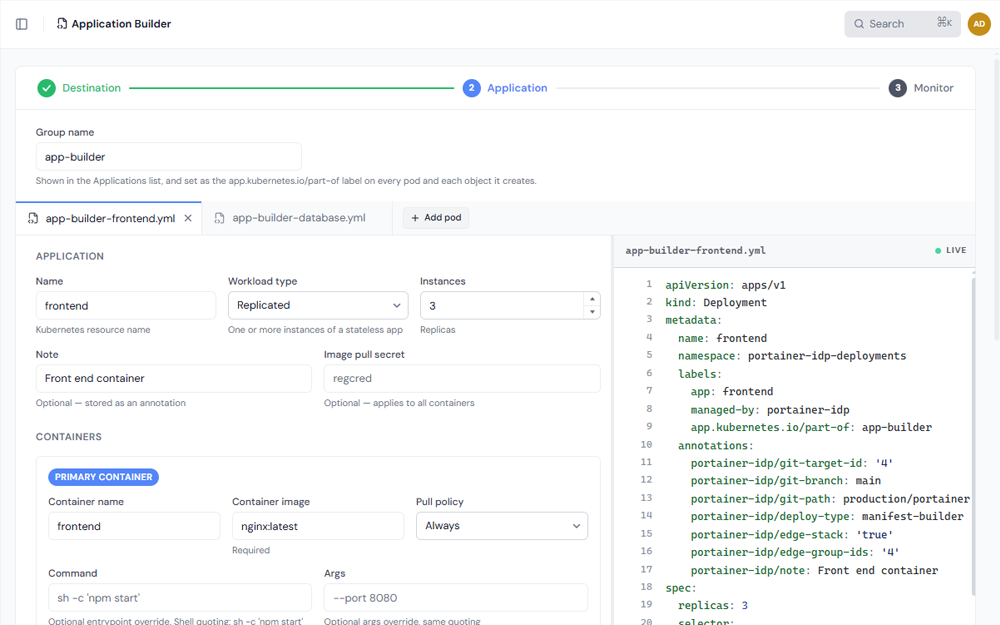
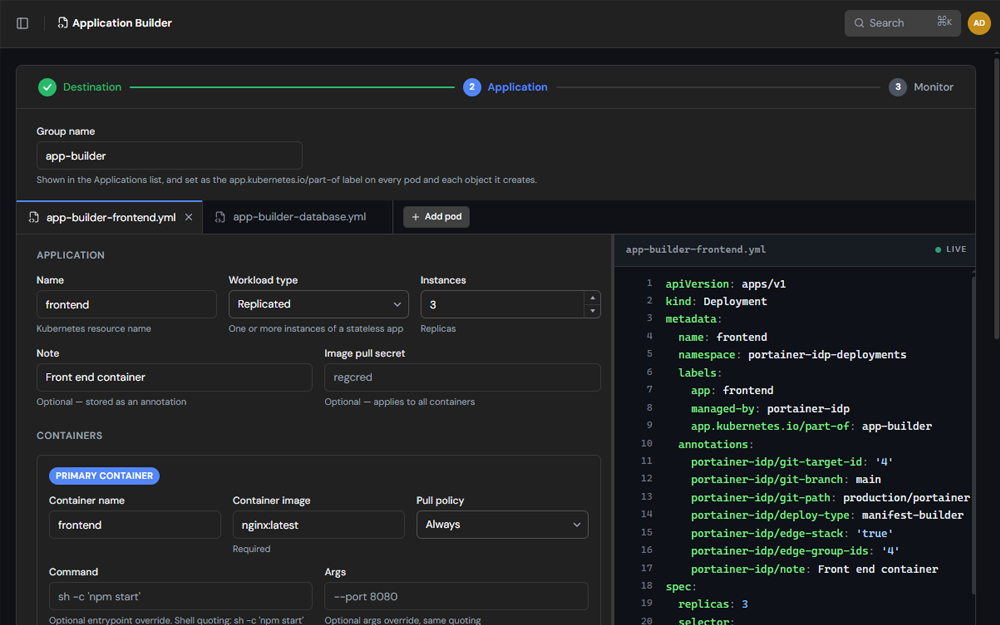
Application Builder
For more demanding workloads: Deployments, StatefulSets and DaemonSets, sidecar and init containers, ConfigMaps, storage, auto-scaling, placement rules and more. Related pods can be deployed together and managed as a group. Groups appear as a tree in the Applications list, have their own page, and can be edited as a whole; the same grouping covers secrets.
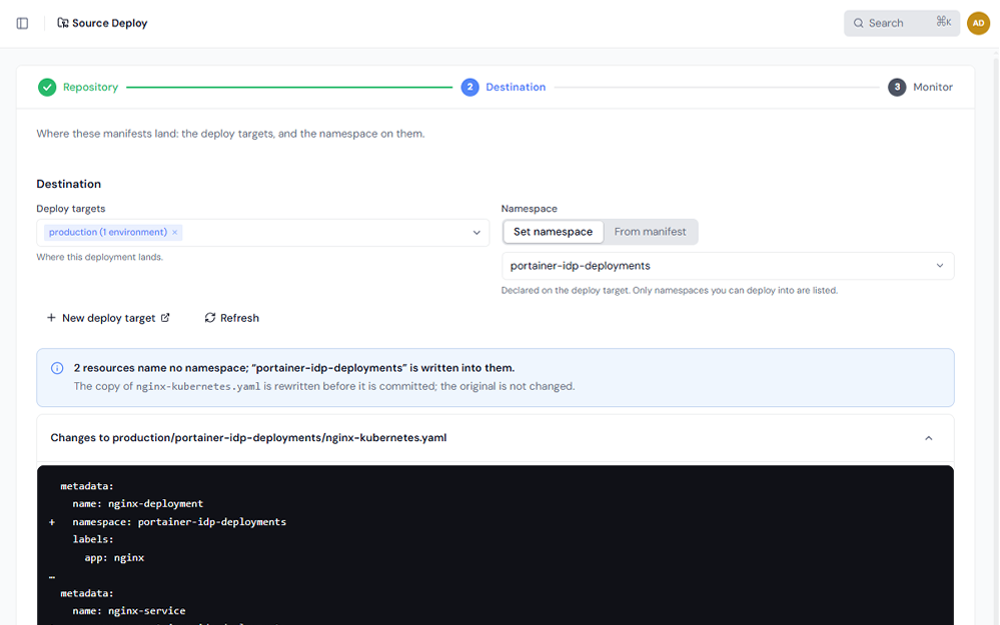
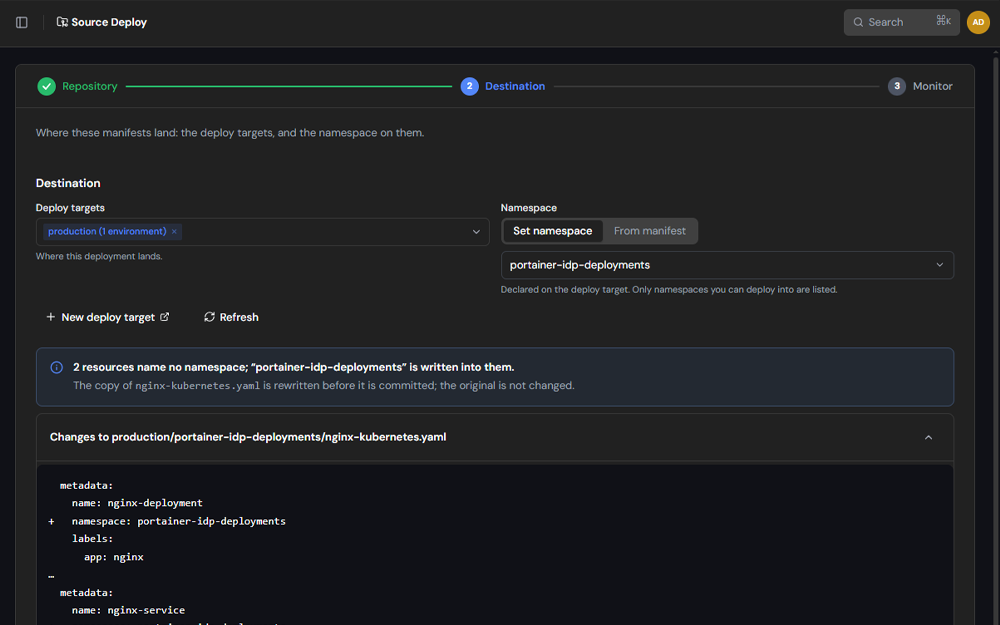
Source Deploy
For teams whose manifests already live in a repository: pick the files, pick a target, deploy.
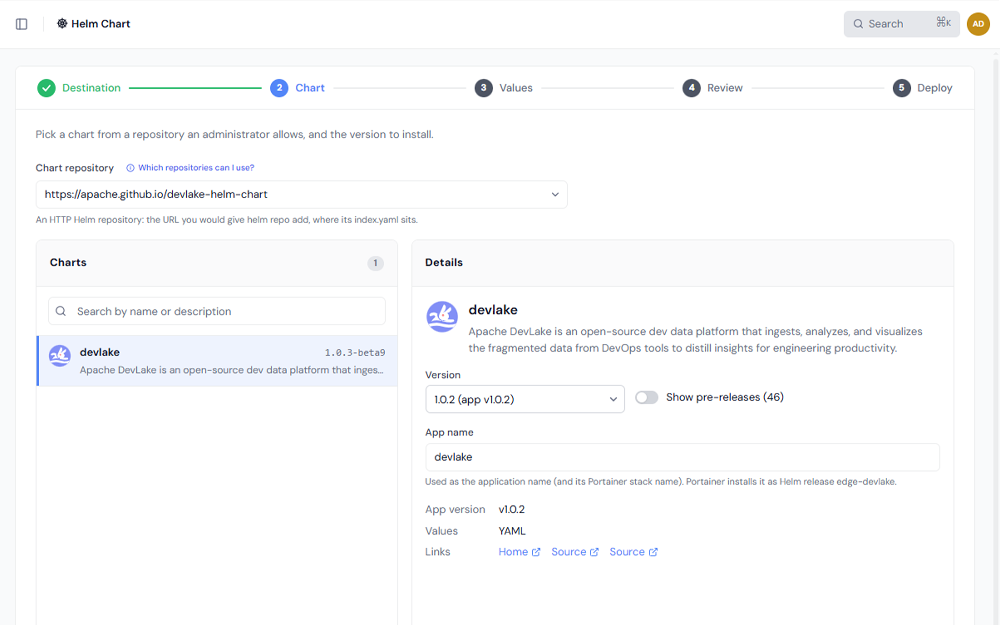
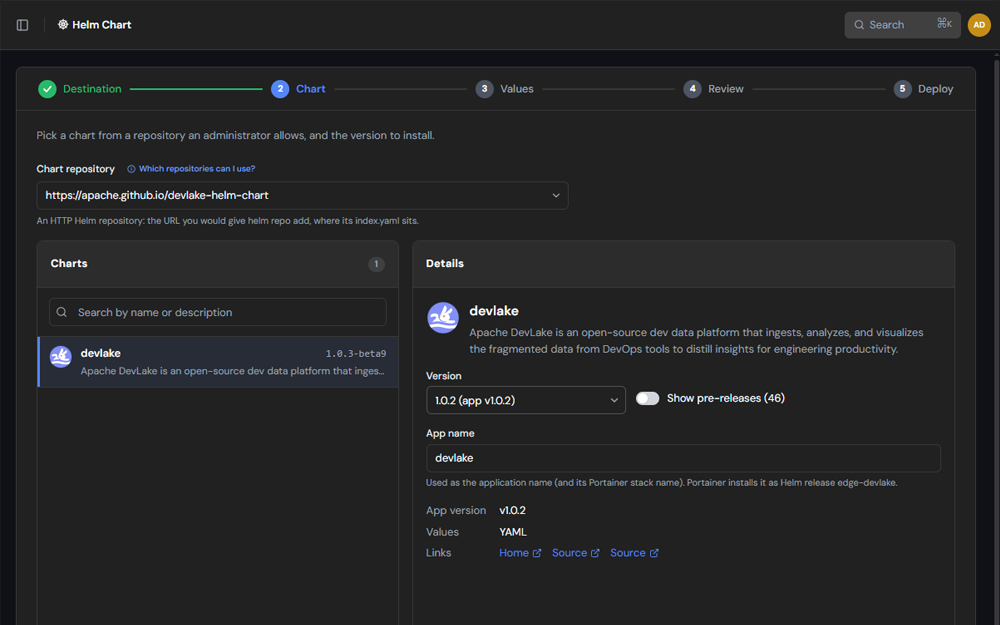
Deploy any Helm chart, held to a policy
Deploy a chart from a repository without writing a manifest. A Chart step helps the developer find and choose the chart, and a Values step shows a live values.yaml as it is filled in.
- ✓Rendered and checked before anything is committed: a bundled copy of Helm renders the chart, and a policy reads what it would create
- ✓The default Standard policy refuses, for example, a chart that creates cluster-scoped objects or a LoadBalancer Service
- ✓Charts come only from allowed repositories: HTTPS hosts on a list that administrators manage
- ✓Committed to the target's repository like any manifest, with a Revisions tab for rollback, and editable afterwards
Works alongside your CI/CD
Portainer-IDP is a self-service tool, not a pipeline. Your CI builds and publishes container images as it does today. Portainer-IDP is where a developer deploys one, or deploys software that has no pipeline at all, without writing a manifest or waiting for someone to build a deploy pipeline first.
Your pipelines keep automating releases for the services you have already productionized. Portainer-IDP covers the rest: deploys a developer starts on demand, and the day-two work after them, inside the guardrails your platform team sets.
Secrets that are encrypted before they reach Git
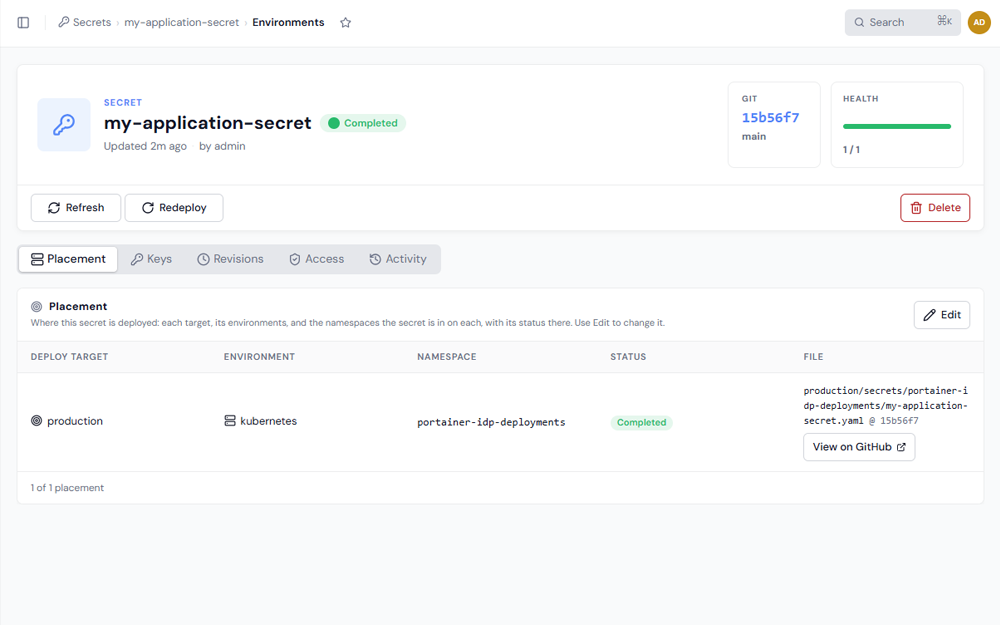
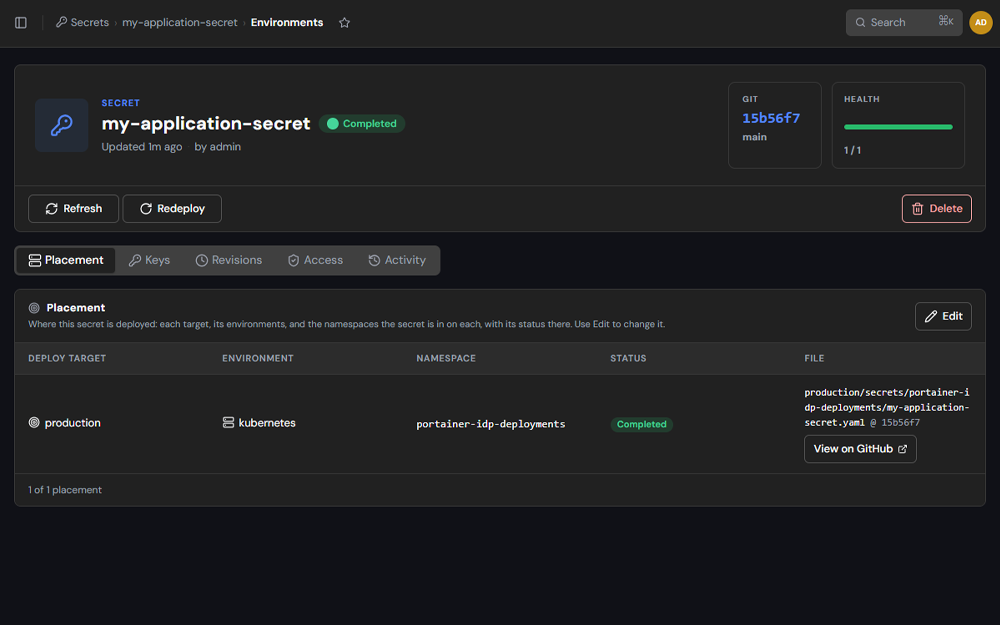
Create a secret once and deploy it to the namespaces and targets you choose. Values are encrypted in the browser with your clusters' public certificate and stored in Git as Sealed Secrets, so only the controller in your clusters can decrypt them. Applications reference a secret by name and key.
- ✓Write-only: no role can read a value back through Portainer-IDP, and plaintext secrets are refused in every Git commit
- ✓One secret, many namespaces and targets, in a single commit, with each namespace's ciphertext bound to that secret's name and namespace
- ✓Update keys, add a namespace or roll back across every namespace the secret is deployed to; a failure is reported per environment, with a Redeploy option
- ✓An access list on every secret, with rights for users and Portainer teams
- ✓Cluster Readiness checks each environment and installs the Sealed Secrets controller with one click
Operate without a kubeconfig
Each application has one page for everything a developer needs after the deploy. Metrics, logs and live state are read on the developer's behalf and scoped to the applications they are allowed to see, so nobody needs a Kubernetes role binding.
Environments
Deployment status on every environment the application targets.
Metrics
Live CPU and memory, with a polling interval you choose: off, 5, 15 or 30 seconds.
Logs
Pod logs, selectable by instance and container.
Revisions
The Git history of the application's manifest, with rollback to an earlier commit.
Access
Who can read, edit and delete the application.
Actions
Edit, scale, restart and delete from the same page, and Open the application's public endpoints (Ingress, Gateway API, LoadBalancer or NodePort) in one click.
The developer gets self-service. You keep the guardrails.
Your platform team decides the rules once, and the backend checks every request rather than trusting the browser.
Four role tiers
Taken from the environment roles already assigned in Portainer. Where someone holds several roles, the most restrictive one applies.
Access lists
On every application, secret and deploy target, granting rights to users and Portainer teams.
Declared namespaces
Platform owners define which namespaces exist on a deploy target, and developers choose only from those they have been granted. A namespace that still holds deployments, and a secret an application still uses, cannot be removed; the interface lists what to remove first.
Ingress defaults per target
Set the base domain, ingress class and TLS secret once, and applications deployed there pick them up.
Cluster Readiness
Checks each environment for ingress, load balancer support, storage, nodes, GPU and the Sealed Secrets controller, and lets administrators switch an environment off.
Backend enforcement
A backend service performs deployments with its own credential, and only after evaluating the caller's access list. Actions are checked against the rights held on each application or secret. Users need no administrator rights in Portainer and no Kubernetes access.
Audit log
Every change made through Portainer-IDP is recorded with who did it, what they did and the outcome, including denied attempts. Administrators can filter and export it, it is kept for 90 days by default, and each event is also written to the add-on's log for your log pipeline.
Git as the record
Commits are made with the developer's own Git identity and carry a trailer naming the Portainer user. Writes never force-update a branch, and an orphaned-manifests report finds manifests outside every deploy target and offers to register or delete them in one commit.
Role tiers
| Tier | What they can do |
|---|---|
| Admin | Everything, including Cluster Readiness, Settings, curating the Helm catalog and its allowed chart repositories, and the audit log. Portainer administrators. |
| Standard | Deploy, edit and delete applications, including Helm charts from allowed repositories, and manage secrets, Git targets and deploy targets they have rights to. |
| Limited operator | Scale, restart and roll back. |
| Read only | View. |
One job, covered in full
Portainer-IDP covers Kubernetes application delivery and day-two operations. Keeping the scope tight means there is nothing to model or maintain before developers start deploying.
Portainer-IDP vs Port, Backstage and Qovery
These products are often compared, but they solve different problems. Port and Backstage are portals for organizing and acting on everything engineering owns. Qovery is an infrastructure platform that provisions and operates Kubernetes in your cloud account. Portainer-IDP is focused on one job: letting developers deploy and run applications on Kubernetes you already manage through Portainer.
| Portainer-IDP | Port | Backstage | Qovery | |
|---|---|---|---|---|
| Category | Kubernetes self-service portal | Internal developer portal | Portal framework | Infrastructure and deployment platform |
| Delivered as | Add-on running in your Portainer cluster | Cloud-native SaaS; dedicated tenancy on Enterprise | Open source; you host and run it | Runs against your AWS, GCP, Azure or Scaleway account; self-hosted control plane on Enterprise |
| Core scope | Deploy, scale, restart, roll back, monitor | Software catalog, actions, scorecards, workflows, AI agents | Software catalog, software templates, TechDocs, plugins | Cluster provisioning, CI/CD, preview environments, observability |
| Kubernetes abstraction | Complete; five deploy routes with live previews | Depends on what you build | Depends on what you build | Managed clusters and generated manifests |
| Identity and roles | Your Portainer users, teams and roles | Its own users; SSO on Standard and above | Configured by you | Built-in roles; custom RBAC and SSO on Enterprise |
| Software catalog and scorecards | Not included | Included | Included | Service catalog on Business plan |
| Provisions clusters | No; uses environments connected to Portainer | No | No | Yes |
| Builds container images | No; deploys images from your own CI | No; actions can trigger your existing CI | No; plugins connect to your existing CI | Yes; builds from a Dockerfile in your Git repository |
| Cost | No cost with Portainer Business | Free to 15 seats; paid plans from $30 to $40 per seat per month, billed annually | Open source; hosting and engineering are yours | Business listed at $2,999 per month for 20 users; Enterprise custom |
Competitor details are taken from each vendor's public website as of September 29, 2026, and may have changed.
Portainer-IDP vs Port
Port is a cloud-native portal with a software catalog, actions, scorecards, workflows and AI agents that you model to fit your organization. It suits teams that want a system of record for everything engineering runs.
Pricing is per seat, and a seat is any authenticated user who accesses Port, so read-only viewers count.
At 100 developers on the Standard plan, that starts at $40 x 100 x 12 = $48,000 per year, before any Enterprise features.
Choose Port if you need a portal that spans your whole engineering estate.
Choose Portainer-IDP if the requirement is getting applications onto Kubernetes safely, without modeling a catalog first.
Portainer-IDP vs Backstage
Backstage is an open source framework, hosted by the CNCF, for building developer portals around a software catalog, software templates and TechDocs.
Because it is a framework, the portal is a project your team owns, hosts and keeps current, and its cost is measured in engineering time instead of license fees.
Choose Backstage if you want full control of a portal and have the team to run one.
Choose Portainer-IDP if you want Kubernetes self-service without that project.
Portainer-IDP vs Qovery
Qovery is the closest in aim, since it also gives developers self-service without a platform team writing YAML. The difference is the layer it works at: it deploys into your own cloud account and provisions and maintains Kubernetes clusters for you.
Bringing your own Kubernetes and self-hosting the control plane are Enterprise features. Anyone with console access counts as a user, including read-only viewers.
The Business plan is listed at $2,999 per month for 20 users, which is $2,999 x 12 = $35,988 per year.
Choose Qovery if you want clusters provisioned and operated for you in a public cloud account.
Choose Portainer-IDP if your clusters already exist, wherever Portainer can reach them, and you want a developer layer on top at no additional cost.
Installs as an add-on to Portainer
Portainer-IDP runs inside Portainer, served behind Portainer's own gateway, so there is no second identity system to maintain.
Install as an add-on
Portainer-IDP is packaged as a Helm chart and installs as a Portainer add-on. The chart asks for nothing at install time.
Press one button
On the Settings page, create the service account the add-on works with. The same button rotates it later without interrupting deploys.
Set up your first target
Connect a Git repository, declare a deploy target and its namespaces, and grant access to your teams. To use secrets, install the Sealed Secrets controller from Cluster Readiness.
Included with Portainer Business
Portainer-IDP is a no-cost add-on to Portainer Business. If you run Portainer Business today, you already have the accounts, roles and environments it needs.
Frequently asked questions
Is Portainer-IDP a full internal developer portal?
It covers one area completely: Kubernetes application delivery and day-two operations. It does not include a software catalog, scorecards or a plug-in framework. If you need one portal for every kind of request your engineers make, a broader platform is the better fit.
Is it a replacement for Backstage or Port?
It solves a narrower problem. Teams that need broad catalog and workflow capabilities will still want a broader portal, and Portainer-IDP suits teams whose main need is safe Kubernetes self-service.
Do I still need CI?
Yes, if you build your own code. Portainer-IDP deploys container images and does not build them. For off-the-shelf software and Helm charts there is no pipeline to maintain.
We already have CI/CD. Do we need this?
They solve different problems. Pipelines automate releases for services that have one. Portainer-IDP gives developers on-demand self-service for software that has no pipeline, without building one first. It does not replace your deployment pipelines, and applications remain ordinary manifests in your Git repository.
Can I add a broader platform later?
Yes. Your applications are plain manifests in your own Git repository.
Does it work with clusters Portainer already manages?
It deploys to Kubernetes environments connected to Portainer.
Do developers need Kubernetes access or Portainer admin rights?
No. Access is granted through Portainer roles and per-application access lists, and the backend enforces them.
Where do manifests live?
In your own Git repository (GitHub, GitLab or Gitea). Every change is a commit made with the developer's own Git identity, with a trailer naming the Portainer user. Portainer-IDP also keeps an audit log of who did what.
Are secrets stored in Git?
Only as encrypted Sealed Secrets. Values are encrypted in the browser with your clusters' public certificate, and only the Sealed Secrets controller in your clusters can decrypt them. Secrets are write-only, so no role can read a value back through Portainer-IDP.
Can developers deploy any Helm chart?
Only charts from allowed repositories, and only if the rendered result passes a policy check. Standard users can deploy such charts, and administrators curate the catalog and manage the list of allowed repositories.
Is there a service catalog?
The Catalog is a set of deployable application templates and Helm charts. It is not a service catalog of dozens of discrete offerings, and there are no VM provisioning workflows.
What does it cost?
Nothing additional with Portainer Business.
Try Portainer-IDP today.
Portainer-IDP is available now in pre-release as a no-cost add-on to Portainer Business. Get started free, or talk to our team about rolling it out.